A Job System for Metal Finishing Quality

TestTrak is a full-featured job system that can document your routers, track your jobs from receiving to shipping, collect and analyze your inspection data, save and analyze DMRs, and keep track of your periodic testing. TestTrak is designed to meet all the requirements of Nadcap Chemical Processing as covered in AC7108 including easy-to-generate rework routers, routers with space to record all required tank immersion and process data, three-tiered rework control, three-tiered document control, statistical process control, as well as scheduling and control of periodic testing.

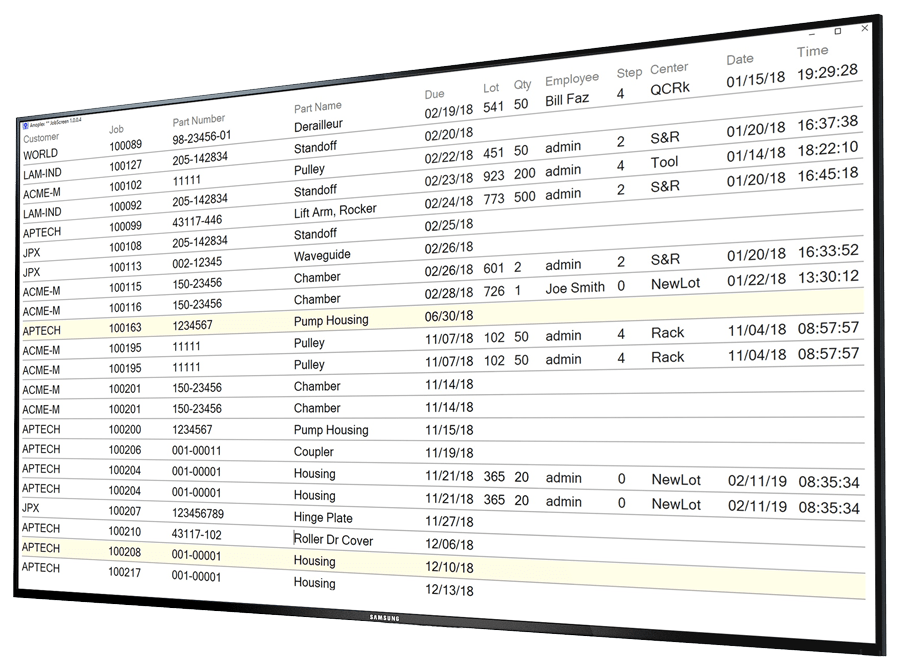
Anoplex offers the JobScreen program to use with TestTrak. JobScreen uses the TestTrak database to display shop scheduling and process line status on an HDTV monitor. JobScreen shows all of the jobs due to ship over the next few days, shows whether all needed tanks have been tested, and updates the display minute by minute as tanks are tested, additions are made, and jobs are shipped.

Setting Up TestTrak Routers

TestTrak includes an editor that lets you quickly create routers for customer parts by copying process templates. When a PO is received, these stored customer part routers can be coupled to your job data (job number, quantity, PO number, etc.) to create a complete job router and job record in a few seconds. This job router can be printed and is available online from PCs throughout your facility. Routers can be marked frozen, locked or unlocked to conform with the three-tiered document control system of AC7108 ¶ 3.3.1, and routers show both total surface area and active (unmasked) surface area to support selective processing.

Editing Test Plans
A TestTrak router includes the inspection and test steps for logging test data and documents the process steps to meet all requirements of AC7108 ¶ 3.3.1. When you click in the Test column, a dropdown menu appears with codes for tests: coating thickness, coupon coating thickness, surface finish, and various other metrics. These tests and codes are defined in a simple text file that can be edited to add new tests, change names, delete tests, etc. A similar text file controls the Units dropdown. The Min and Max fields set the LSL and USL for statistical analysis and provide acceptance test limits for inspection.

AC7108 ¶ 5.9 requires documentation of masking procedures and materials, while AC7108 ¶ 3.3.1 requires a router to fully document tooling, racking, masking and all processing steps. While the focus of TestTrak is on quality inspections, these other AC7108 requirements may also be covered. Most workcenter-based job system routers do not list every tank, because it takes too much work to set up every tank as a workcenter: the result is that these workcenter-based routers neither meet Nadcap requirements nor fully document your process.

For complex masking and tooling operations, TestTrak router steps may be linked to an external spreadsheet that allows graphics, pictures, flowcharts and other extensive documentation to be linked to your process routers when required for a complex process. These linked spreadsheets may be opened online and/or printed as required for reference.

TestTrak also allows part photographs to be linked to each plan. A camera will appear as a folder when attached to a USB port, and photos may be selected through the familiar Windows dialog. Once a photo is linked, it will appear online and in the heading of your routers for all future jobs.

Using TestTrak in Production

Powerful searching and sorting tools make it easy to find the correct router for job entry when a PO is received. When customer name, part number, or a partial part description is entered, the search grid will be filtered down to show only those parts that match. Point and click to select the router and enter the job. TestTrak Job Entry
The Job History Log appears beside the Parts List during job entry for visibility into shop load and to facilitate checking for similar jobs or other jobs for the same customer. The photograph of the part linked to the router is visible to help Receiving match print and parts to the correct router.

Under the Job Tools tab you see the Job History Log and are able to enter quantities, received date, inspection dates, ship dates, and shipper information.

TestTrak will generate sequential six-digit job numbers and five-digit shipper numbers automatically; however, if you have a financial or ERP system in use, you can easily enter the job and shipper numbers from your financial system. Shippers can be quickly located using the shipper number as search criteria to show all jobs shipped together. You can also search for jobs by final QC date, ship date or purchase order. (As well as by customer, part number, part name, process and material.)

TestTrak Job Tools
TestTrak shop routers are based on an Excel template that you can customize with your corporate logo and modify to suit your needs. For example, the test panels commonly used by your shop can be listed with checkboxes to support the kind of periodic tests that you perform.

All job and part information is automatically printed in the header of each router including frozen status, active area, and other information required by AC7108 ¶ 3.3.1. In addition, part photos may appear in the heading of your routers to help with traceability throughout production.

Tank sequences, times, ASF, etc. may be captured in top level routers, or in sub-part routers specific to the various preps required. Each router line allows up to three specifications to cover thickness, ASF, temperature, etc. Router sub-process steps are colored light blue to help operators distinguish between the top-level and the wet processing steps. Router steps requiring collection of test data are colored light green to help QC inspectors easily find the information they need. If you print routers on a monochrome printer, the colors show up as a light gray background - it is not quite as useful as color, but it still helps.

The router shown to the right has red outline boxes as indication of recording requirements per AC7108 Appendix D; however, routers can be setup with or without recording depending on whether the process is within the scope of accreditation and arrangements with the cognizant engineering authority. You may also record critical parameters and use TestTrak’s statistical analysis tools to determine Cpk; however, this is not a Nadcap requirement.

There is a direct correlation between process repeatability and router ease of reading and accuracy: you should have the best routers possible - TestTrak can make that a sure thing.
TestTrak Router
When your parts and router arrive in QC, the QC inspector will select the job in TestTrak that matches the router and click the Test Data tab. This will show the online part router and allow the inspector to click the required QC test step in the online router. When the test step is clicked, the data entry fields highlight in green, and the test results can be entered and saved. The number of test boxes that highlight is controlled by the test # column in the plan. In the example, there are 24 locations on each serial number part that must be tested for anodize thickness. The exact locations will be documented in an Excel-based test instruction which also serves to format the printed certificate and test inspection report. Your sampling plan is built into each part router per AC7108 ¶ 3.1.2.

TestTrak Test Plan
TestTrak includes an easy to use DMR system that allows quick selection of observations and dispositions along with collection of critical counts on inspection, rework and scrap. Collection and trending of this data is required by AC7108 Appendix A2.1.1. Eight step categories and eight observation categories can be defined to suit your needs.

DMRs can be entered under the Test Data tab by QC inspectors, while MRB disposition records and DMR analysis is done under the DMR Analysis tab. TestTrak records the complete DMR history for your shop and allows display of all DMRs or only those DMRs for a single part or a single process.
TestTrak DMR Analysis
The DMR step/observation codes are shown in a two-dimensional grid with numbers and red color intensity at the intersections to make it easier to interpret the DMR distributions. DMRs may be selected in the DMR history grid so that MRB notes on containment and material disposition may be added or other information edited during MRB. TestTrak also generates a print out of weekly DMR trends and paretos. AC7108 Appendix A requires capture of data on "internal reprocessing and rework, repair, internal rejects, customer rejects and customer complaints, costs, turnaround times, waste streams, scrap etc.", and TestTrak can give you the ingredients that other job systems lack.

Statistics including control chart of recent values and distribution charts of all values are updated immediately as data is saved, allowing the QC inspector or manager to see values that are out of the norm and assess the impact on process control. Feedback to production can be immediate.

Inspection test data in tabular form is color coded based on the result value position in the specification range. The colors correspond to the colored bars in the distribution chart allowing a visual and intuitive correlation between the statistical distribution and the time domain data.
TestTrak SPC Analysis
A unique and powerful feature of TestTrak is its ability to show statistics for a single part and all of the parts that share the same process on the same screen - even when the various parts have different target thickness, surface finish, etc. This is accomplished by normalizing the data and reporting mean and sigma as percentages of the specification range. A job shop that handles a wide variety of parts within each supported process will find these tools quite valuable. A precious metal plater who wants to control gold or platinum thickness and cost, will find these tools indispensable. With a click of a button, the distribution graph can be switched between part and process.

TestTrak SPC Analysis

Periodic Testing

A Test Matrix is critical for planning accreditation scope, backing up certifications, and conforming to AC7108 ¶ 4.4.1. TestTrak provides an interface for scheduling testing, logging your specimen job runs and entering the results. The TestTrak grid highlights required periodic tests that are due and allows pass/fail checks, notes, etc. Job numbers can be recorded per AC7108 ¶ 4.2. The time sequencing allows for trend analysis, recall support, etc. The TestTrak test log allows capture of a review date and reviewer’s initials in conformance with AC7108 ¶ 4.2.2, and the note field may be used to reference retest and replacement test results. Periodic Test Log
TestTrak client PCs can run either Windows XP or Windows 7, while network servers can run either Server 2003 or Server 2008. TestTrak is designed as a networked system with server-resident database; although it can be run on a standalone PC also. The database is MS Access. User passwords and privilege levels are built in to TestTrak to prevent production users from modifying engineering routers and to provide other access protection.

TestTrak can be used side-by-side with ERP systems or as a standalone job system with Quickbooks Pro or other financial software to handle back end accounting. Whether you are planning Nadcap accreditation, or you just want a better job system, you should contact sales@anoplex.com. There is simply no easier way to meet the requirements.